
Who knew that #nvi had a config file? Not me until today.
nvi

Still using nvi on Slackware.
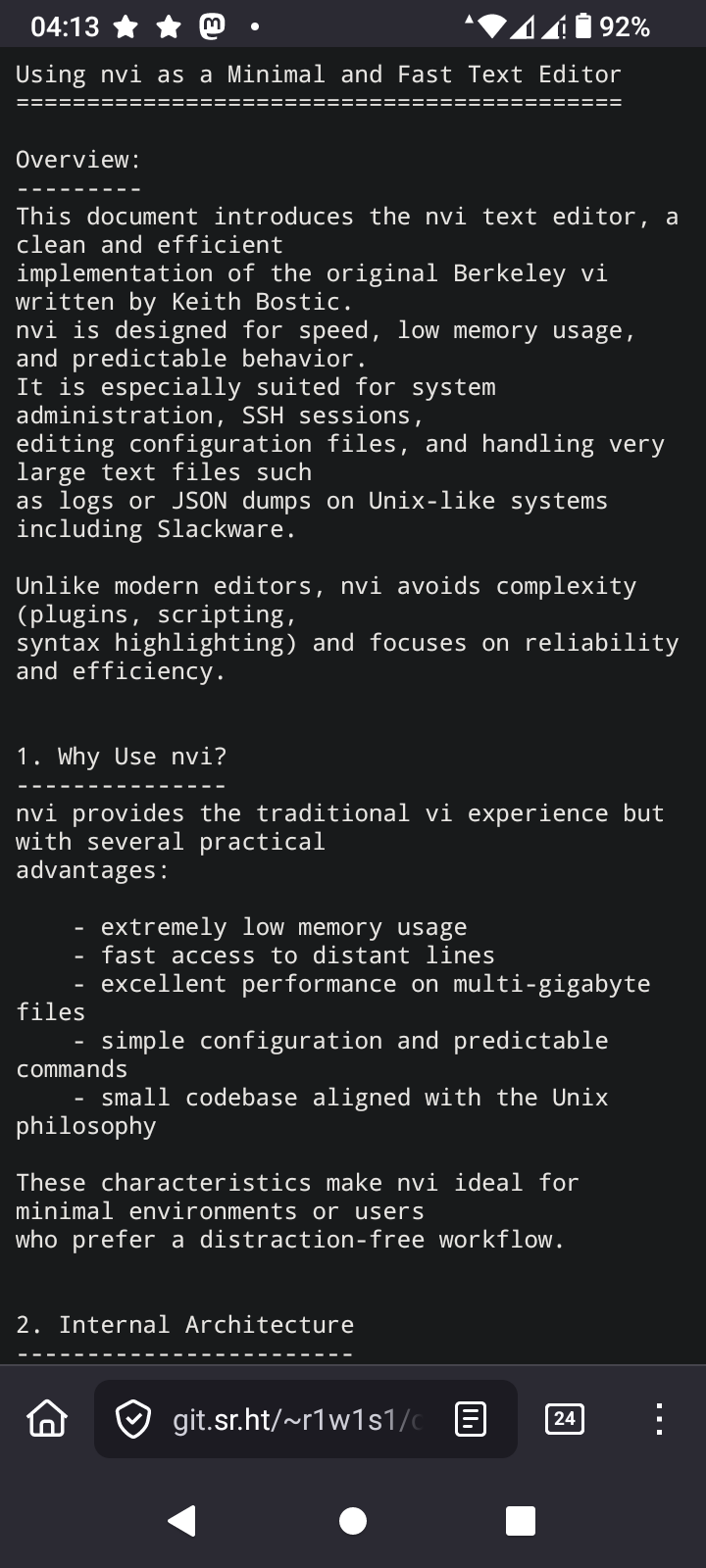
No plugins. No syntax highlighting. Just speed, predictability, and classic vi behavior, even with multi-GB files.
I wrote a short guide explaining why nvi still matters and how its architecture enables fast, low-memory editing.
📄 https://4c6e.xyz/code_notes.html (NVI Editor Guide)
📄 https://git.sr.ht/~r1w1s1/code-notes/blob/main/notes/NVI_Editor_Guide.txt (plain text)
#slackware #editor #nvi #vi #unix #minimalism
No plugins. No syntax highlighting. Just speed, predictability, and classic vi behavior, even with multi-GB files.
I wrote a short guide explaining why nvi still matters and how its architecture enables fast, low-memory editing.
📄 https://4c6e.xyz/code_notes.html (NVI Editor Guide)
📄 https://git.sr.ht/~r1w1s1/code-notes/blob/main/notes/NVI_Editor_Guide.txt (plain text)
#slackware #editor #nvi #vi #unix #minimalism
TIL again, about low ram footprint editors in OpenSource environments.
In the period where the following commands were valid
ATX3DT
ATA
Such editors were standard. I'm talking about vi. Over extremely noisy POTS lines without error correction, vi was the only editor you could use safely. I remember switching from editing mode to reading mode as frequently as possible, because the 2400 BPS modem from the SR University, had difficulty to keep the line as noise free as possible due to the archaic hardware infrastructure of the phone company.
The editor I'm learning again about is nvi
I'm going to take a deep dive into this, because one thing I love is using the least memory as possible while computing
#vi #nvi #vim #VimMasterRace #editor #SSH #AT #Hayes #OpenSource #programming #Linux #technology
https://4c6e.xyz/code_notes.html
Edited 312d ago
Today in #FreeSoftwareAdvent, I realized how much my daily setup changed over the years.
I removed my external monitor and keyboard.
Not to be minimalist, but to reduce context switching.
I kept the mouse because speed still matters.
Working sometimes from my parents house made it clear that relying on an external monitor was fragile, so I forced myself to work only with the laptop.
The same thing happened with software.
Vim slowly became nvi.
Alacritty became xterm, then st.
I didn’t look for lighter tools, but for ones I could trust and reason about. Less abstraction, fewer surprises.
Today I use two identical laptops -- one for work, one personal -- same setup, side by side, one mouse for each.
The environment disappears, and the work stays.
#suckless #st #nvi #xterm
I removed my external monitor and keyboard.
Not to be minimalist, but to reduce context switching.
I kept the mouse because speed still matters.
Working sometimes from my parents house made it clear that relying on an external monitor was fragile, so I forced myself to work only with the laptop.
The same thing happened with software.
Vim slowly became nvi.
Alacritty became xterm, then st.
I didn’t look for lighter tools, but for ones I could trust and reason about. Less abstraction, fewer surprises.
Today I use two identical laptops -- one for work, one personal -- same setup, side by side, one mouse for each.
The environment disappears, and the work stays.
#suckless #st #nvi #xterm

In #openbsd what is called #vi is actually #nvi, and when you install #nvi from ports, it is #nvi2.
To danes with our national characters æøå we need the latter because #vi prints two byte hex sequences for æ, ø, or å. #vi handles them correctly except for the printing of them.
#vi and #nvi use the same #man page.
Update:
On #netbsd #vi is also #nvi. Here you must install #nvi2 to get #nvi if you need æ, ø, and å support.
Best wishes from T. R. Dane (The Real Dane ;)
Edited 202d ago
I saw this post and it motivated me to do a quick test:
https://phanpy.social/#/hachyderm.io/s/115891592999188880
Stop opening huge files in screen editors.
Screen editors (nvi, vim, etc.) assume you want to scroll,
see context, and move a cursor interactively.
Huge files break those assumptions.
For large files (1GB+):
Benchmark (1GB text file):
They need better workflows.
For huge files, the right solution is not tuning screen editors,
but using the right tools:
nvi chooses predictability over perceived speed.
The slowdown is not a flaw — it’s the cost of preserving
classic vi semantics within a screen-editor model.
#vim #nvi #ed #unix #linux #cli #sysadmin
https://phanpy.social/#/hachyderm.io/s/115891592999188880
Stop opening huge files in screen editors.
Screen editors (nvi, vim, etc.) assume you want to scroll,
see context, and move a cursor interactively.
Huge files break those assumptions.
For large files (1GB+):
- Inspect: head, tail, grep
- Understand structure: awk, sed -n (stream, don’t load)
- Surgical changes: ed or sed
Benchmark (1GB text file):
- nvi -> 20.1s (eager line indexing ~25M lines)
- vim -> 7.7s (lazy loading, deferred UI cost)
- ed -> 4.0s (I/O-bound buffering, no TUI overhead)
They need better workflows.
For huge files, the right solution is not tuning screen editors,
but using the right tools:
- shell tools for inspection
- ed for known, surgical changes
- screen editors when interactive rewriting is actually needed
nvi chooses predictability over perceived speed.
The slowdown is not a flaw — it’s the cost of preserving
classic vi semantics within a screen-editor model.
#vim #nvi #ed #unix #linux #cli #sysadmin
Edited 279d ago
A short note on using nvi as part of a simple Unix workflow in 2026.
https://git.sr.ht/~r1w1s1/code-notes/blob/main/notes/Using_NVI_in_2026.txt
#unix #editors #plaintext #nvi #vi #slackware
https://git.sr.ht/~r1w1s1/code-notes/blob/main/notes/Using_NVI_in_2026.txt
#unix #editors #plaintext #nvi #vi #slackware

Currently I'm a #vim user with only two plugins loaded by vims own system no packer or anything. They are the gruvbox theme and colorizer to color HTML color codes.
I've been researching to see if I could work with #nvi and wondered about undo history and found that it might be possible ?
I've been researching to see if I could work with #nvi and wondered about undo history and found that it might be possible ?
uIf you're an nvi user what other tips or hacks are there that I should know about ? I don't suppose there is some magical way to theme it ?
Undo the last change made to the file. If repeated, the u command alternates between these two states. The . command, when used immediately after u, causes the change log to be rolled forward or backward, depending on the action of the u command.
Ever wonder why vi uses hjkl for movement?
It's not arbitrary—it's hardware history. The ADM-3A terminal had arrows printed directly on those keys.
ESC was also where Tab is now. Vi wasn't designed for ergonomics, it was designed for the keyboard that existed.
http://www.slackware.com/~r1w1s1/nvi.html#_curiosities
#nvi #vim #vi
It's not arbitrary—it's hardware history. The ADM-3A terminal had arrows printed directly on those keys.
ESC was also where Tab is now. Vi wasn't designed for ergonomics, it was designed for the keyboard that existed.
http://www.slackware.com/~r1w1s1/nvi.html#_curiosities
#nvi #vim #vi
Currently I'm a #vim user with only two plugins loaded by vims own system no packer or anything. They are the gruvbox theme and colorizer to color HTML color codes.
I've been researching to see if I could work with #nvi and wondered about undo history and found that it might be possible ?
I've been researching to see if I could work with #nvi and wondered about undo history and found that it might be possible ?
uIf you're an nvi user what other tips or hacks are there that I should know about ? I don't suppose there is some magical way to theme it ?
Undo the last change made to the file.
If repeated the u command alternates between these two states.
The . command when used immediately after u causes the change log to be rolled forward or backward depending on the action of the u command.
Edited 207d ago
I think in my #vi journey on #OpenBSD that I'm leaning towards #nvi as in nvi2. Only because I do use some nerd font stuff to pretty up some of my menus and my bar. But obviously that could change as I may get rid of those nerd fonts and just stick with plain text?
If you're an OpenBSD user and use vi instead of vim do you use the builtin n(vi) or nvi2 ?
https://github.com/lichray/nvi2
If you're an OpenBSD user and use vi instead of vim do you use the builtin n(vi) or nvi2 ?
https://github.com/lichray/nvi2
Reading an old UNIX Review article from September 1984 about
termcap. Fascinating how much modern terminal software still
inherits ideas from this era.
vi depended heavily on terminal capability databases to remain
portable across different hardware terminals. Bill Joy originally
wired vi only for Lear Siegler ADM-3A terminals, and termcap was
born from the flood of requests for support on other hardware.
"Termcap Unveiled" by Douglas R. Merritt, pages 42-48.
https://archive.org/details/Unix_Review_1984_Sep.pdf/page/n43/mode/2up
Also updated my nvi notes with a small historical section about
termcap/curses and terminal portability.
https://repo.or.cz/code-notes.git/blob_plain/HEAD:/notes/NVI_Editor_Guide.txt
#vi #unix #termcap #nvi #linux
termcap. Fascinating how much modern terminal software still
inherits ideas from this era.
vi depended heavily on terminal capability databases to remain
portable across different hardware terminals. Bill Joy originally
wired vi only for Lear Siegler ADM-3A terminals, and termcap was
born from the flood of requests for support on other hardware.
"Termcap Unveiled" by Douglas R. Merritt, pages 42-48.
https://archive.org/details/Unix_Review_1984_Sep.pdf/page/n43/mode/2up
Also updated my nvi notes with a small historical section about
termcap/curses and terminal portability.
https://repo.or.cz/code-notes.git/blob_plain/HEAD:/notes/NVI_Editor_Guide.txt
#vi #unix #termcap #nvi #linux
Spent the day exploring heirloom-ex-vi (n-t-roff). It's
essentially the cleaned-up 1985 ex/vi 3.7 code, brought
forward by Gunnar Ritter and Carsten Kunze: small, simple,
and very readable — about 25k LOC for the editor itself,
versus 38k for nvi. The memory footprint is lower too,
around 3MB RSS against nvi's 6MB in typical use, and it
feels snappy in daily use.
The limits are by design rather than oversight. Fixed
temp-file blocks and a line-pointer table capped at
LBLKS=900 in the default build give you about 230k lines,
or roughly 30MB of text. Beyond that, you get the classic
"Tmp file too large" — and that's fine, because a screen
editor isn't the right tool for huge files anyway.
Trade-offs worth knowing: no
undo, and a hard ceiling on file size. nvi is more
practical for daily work, especially if you live in YAML
where column awareness matters. But heirloom is closer to
the original, and the codebase is genuinely beautiful.
Worth a look.
For anyone curious about the details, I keep a longer note
on heirloom-ex-vi here:
https://repo.or.cz/code-notes.git/blob_plain/HEAD:/notes/Exploring_Heirloom_ex_vi.txt.
Updated today with the LARGEF rebuild instructions for
files beyond the default ceiling.
#vi #unix #suckless #nvi
essentially the cleaned-up 1985 ex/vi 3.7 code, brought
forward by Gunnar Ritter and Carsten Kunze: small, simple,
and very readable — about 25k LOC for the editor itself,
versus 38k for nvi. The memory footprint is lower too,
around 3MB RSS against nvi's 6MB in typical use, and it
feels snappy in daily use.
The limits are by design rather than oversight. Fixed
temp-file blocks and a line-pointer table capped at
LBLKS=900 in the default build give you about 230k lines,
or roughly 30MB of text. Beyond that, you get the classic
"Tmp file too large" — and that's fine, because a screen
editor isn't the right tool for huge files anyway.
Trade-offs worth knowing: no
set ruler, single-levelundo, and a hard ceiling on file size. nvi is more
practical for daily work, especially if you live in YAML
where column awareness matters. But heirloom is closer to
the original, and the codebase is genuinely beautiful.
Worth a look.
For anyone curious about the details, I keep a longer note
on heirloom-ex-vi here:
https://repo.or.cz/code-notes.git/blob_plain/HEAD:/notes/Exploring_Heirloom_ex_vi.txt.
Updated today with the LARGEF rebuild instructions for
files beyond the default ceiling.
#vi #unix #suckless #nvi
Edited 165d ago



 🍵
🍵 
Trying out #nvi-1.81.6 on #Debian as my primary editor on my work box for a bit.
At first, I was sad that I could no longer
some_command |vi
like you can with (neo)?vim, but then I realized you could just as easily
vi <(some_command)
Hmmm, the lack of line selection mode is a bummer. This might have more pain points than I was anticipating. XD
Maybe I should try #vim-tiny?
Interestingly, #FreeBSD comes with #nvi2 in base, while #OpenBSD and #NetBSD seem to be running #nvi 1:
FreeBSD 14.3-RELEASE-p12
~
~
~
Version 2.2.2 (2025-10-08) The CSRG, University of California, Berkeley.
OpenBSD 7.3
(7.9 is still running the same version)
~
~
~
Version 1.79 (10/23/96) The CSRG, University of California, Berkeley.
NetBSD 10.1
~
~
~
Version (1.81.6-2013-11-20nb4) The CSRG, University of California, Berkeley.
They all seem to have nvi2 available as packages, though, which #Debian, oddly, does not.
rld@Intrepid:~$ uname -sr
FreeBSD 14.3-RELEASE-p12
rld@Intrepid:~$ pkg search nvi |grep '^nvi2'
nvi2-2.2.2                     Updated implementation of the ex/vi text editor
rld@Intrepid:~$
#(searching openbsd online)
rld@Intrepid:~$ searchall -o nvi |grep ^nvi
nvi-2.2.2                (list)   with wide         and files limited by
nvi-2.2.2-iconv          (list)   with wide         and files limited by
rldane@rosa.tilde.pink$ uname -sr
NetBSD 10.1
rldane@rosa.tilde.pink$ pkgin search nvi |grep ^nvi |grep -v nvidia
nvi-1.81.6nb13       Berkeley nvi with additional features
nvi-m17n-1.79.20040608nb11  Clone of vi/ex, with multilingual patch
nvi2-2.2.0           Multibyte fork of the nvi editor for BSD
rldane@rosa.tilde.pink$
~ $ head -1 /etc/os-release
PRETTY_NAME="Raspbian GNU/Linux 13 (trixie)"
~ $ apt-cache search nvi |grep -E '^nvi2? '
nvi - 4.4BSD re-implementation of vi
~ $
Is there a solid book or PDF guide I can get on (traditional) vi?
I'm finding the manpages... terse. 🫠
* manPAGES, as in, I'm consulting different ones
New #blog #post: Vim Carnival Entry: "The Motion that Changed Everything."
https://rldane.space/vim-carnival-entry-the-motion-that-changed-everything.html
1224 words
cc: my wonderful #chorus: @joel @dm @sotolf @thedoctor @pixx @orbitalmartian @adamsdesk @krafter @roguefoam @clayton @giantspacesquid @Twizzay @stfn
(I will happily add/remove you from the chorus upon request! :)
Thanks to @hyde for the blog concept, and immediate apologies if you get trapped in a #hellthread! 😄
#rlDaneWriting #blost #vi #vim #nvi #editor #VimCarnival #TheMotionThatChangedEverything #modal #ADHD
Post your #NeverSlop tech stack!
I'm thinking...
- OS: #NetBSD, #Illumos, #Haiku, #RedoxOS or #9front
- Editor: #ed, #nvi, or #VimClassic
- eBooks: #clbre??? (Doesn't seem to have any downloads yet); #arcalibre?
- Social: (egad, #Mastodon is already sloppified?!?) #GoToSocial, #snac2, hopefully #LittleFedi
- Audio editing: #Tenacity
- Browser: #KonformBrowser
- Image editing: libvips
- Data/file encryption: #LibreSSL, ccrypt
- Password Manager: #ChiPass
- Terminal Multiplexer: GNU #Screen and #OpenTmux
- Email: #aerc, #clawsMail
(I haven't tried all of these yet)
Edited 23d ago