suckless

st vs xterm on Slackware -current, same font (Iosevka), bare shell, idle:
#suckless #xterm #linux #st #slackware
Code: st 5,500 lines / xterm 111,306 lines (20× larger)Suckless optimizes for code size, not runtime size. Different things.
RAM: st 28.3 MB RSS / xterm 22.0 MB RSS (xterm uses 22% less)
20× more code, 22% less memory.
#suckless #xterm #linux #st #slackware
I revisited the 2018 LWN series “A look at terminal emulators” and re-read its notes on st.
Back then, the articles tested st 0.6/0.7 (Debian/Fedora) and 0.8.1 upstream, a fair snapshot of the time.
I went through the upstream st git history from 2018 → 2025 and mapped many of the issues discussed (Unicode/wide glyphs, input crashes, paste & tmux integration, redraw/latency, escape sequences) to the actual fixes that landed over the years.
No single “big patch”, just steady maintenance:
wide-glyph correctness, crash-class input fixes, bracketed paste terminfo, latency tuning, and modern escape/color handling.
I wrote a short technical note with links to the relevant commits:
https://4c6e.xyz/code_notes.html
(post: Revisiting ST after the 2018 LWN analysis)
I’ve been using st + tmux daily on Slackware and it’s been solid: minimal, fast, predictable — exactly what I want on X11.
#st #suckless #unix #tmux #x11 #slackware
Back then, the articles tested st 0.6/0.7 (Debian/Fedora) and 0.8.1 upstream, a fair snapshot of the time.
I went through the upstream st git history from 2018 → 2025 and mapped many of the issues discussed (Unicode/wide glyphs, input crashes, paste & tmux integration, redraw/latency, escape sequences) to the actual fixes that landed over the years.
No single “big patch”, just steady maintenance:
wide-glyph correctness, crash-class input fixes, bracketed paste terminfo, latency tuning, and modern escape/color handling.
I wrote a short technical note with links to the relevant commits:
https://4c6e.xyz/code_notes.html
(post: Revisiting ST after the 2018 LWN analysis)
I’ve been using st + tmux daily on Slackware and it’s been solid: minimal, fast, predictable — exactly what I want on X11.
#st #suckless #unix #tmux #x11 #slackware
Today in #FreeSoftwareAdvent, I realized how much my daily setup changed over the years.
I removed my external monitor and keyboard.
Not to be minimalist, but to reduce context switching.
I kept the mouse because speed still matters.
Working sometimes from my parents house made it clear that relying on an external monitor was fragile, so I forced myself to work only with the laptop.
The same thing happened with software.
Vim slowly became nvi.
Alacritty became xterm, then st.
I didn’t look for lighter tools, but for ones I could trust and reason about. Less abstraction, fewer surprises.
Today I use two identical laptops -- one for work, one personal -- same setup, side by side, one mouse for each.
The environment disappears, and the work stays.
#suckless #st #nvi #xterm
I removed my external monitor and keyboard.
Not to be minimalist, but to reduce context switching.
I kept the mouse because speed still matters.
Working sometimes from my parents house made it clear that relying on an external monitor was fragile, so I forced myself to work only with the laptop.
The same thing happened with software.
Vim slowly became nvi.
Alacritty became xterm, then st.
I didn’t look for lighter tools, but for ones I could trust and reason about. Less abstraction, fewer surprises.
Today I use two identical laptops -- one for work, one personal -- same setup, side by side, one mouse for each.
The environment disappears, and the work stays.
#suckless #st #nvi #xterm
Minimalism isn’t about aesthetics.
It’s about removing waste and keeping only what’s functional.
The character comes from use, not decoration.
A few moments of the same idea, different contexts:
https://www.reddit.com/r/thinkpad/s/hnxOCFXRhy
https://www.reddit.com/r/thinkpad/s/6IgxcCreKy
https://www.reddit.com/r/Minimal_Setups/s/buTWerlfHi
#suckless #linux #thinkpad #minimalism
It’s about removing waste and keeping only what’s functional.
The character comes from use, not decoration.
A few moments of the same idea, different contexts:
https://www.reddit.com/r/thinkpad/s/hnxOCFXRhy
https://www.reddit.com/r/thinkpad/s/6IgxcCreKy
https://www.reddit.com/r/Minimal_Setups/s/buTWerlfHi
#suckless #linux #thinkpad #minimalism
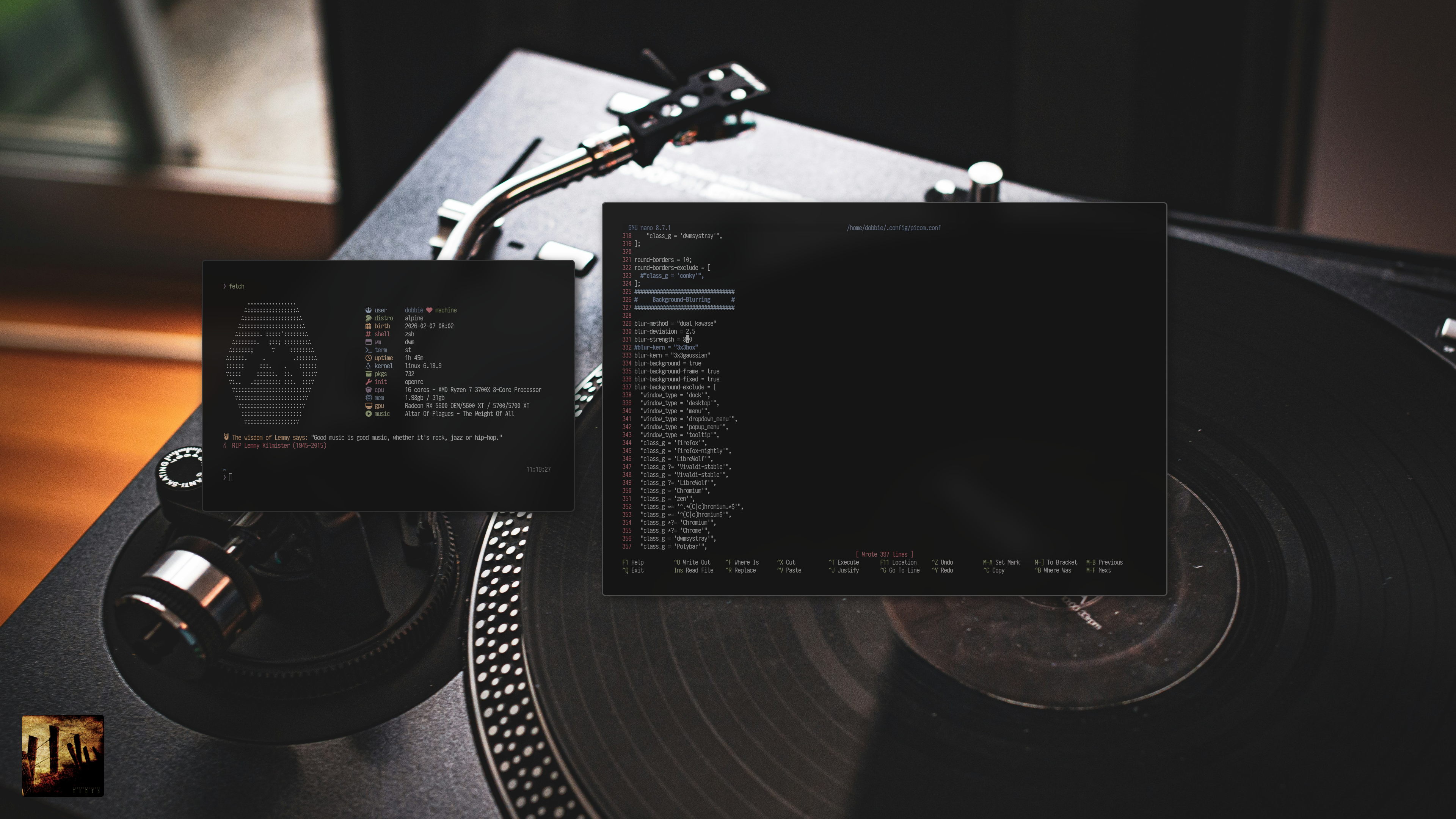
My Alpine install is complete.
Surprising absolutely no one that has known me for a while, I am running dwm.
What an amazing distro. I think I am probably going to move to Alpine full-time.
#alpinelinux #suckless #dwm #blackmetal #altarofplagues #nowplaying
Just switched to mtm (Micro Terminal Multiplexer) a suckless-style terminal multiplexer that does ONE thing: split panes. No sessions, no bloat, just ~1000 lines of clean C code.
The codebase is surprisingly readable and well-organized... unlike larger projects where you get lost in abstraction layers, mtm's simplicity makes it an excellent study resource for learning C.
You can actually understand the entire program flow in a reasonable amount of time.
Bonus: there's already a SlackBuild available, so Slackware users can integrate it seamlessly into their system without manual compilation headaches.
If you want tmux functionality without tmux complexity, check it out.
https://slackbuilds.org/repository/15.0/system/mtm/
#suckless #terminal #slackware #C
The codebase is surprisingly readable and well-organized... unlike larger projects where you get lost in abstraction layers, mtm's simplicity makes it an excellent study resource for learning C.
You can actually understand the entire program flow in a reasonable amount of time.
Bonus: there's already a SlackBuild available, so Slackware users can integrate it seamlessly into their system without manual compilation headaches.
If you want tmux functionality without tmux complexity, check it out.
https://slackbuilds.org/repository/15.0/system/mtm/
#suckless #terminal #slackware #C
Just published a dwm config.h quick reference practical guide for customising vanilla dwm without knowing C.
https://r1w1s1.srht.site/dwm.html
Feedback welcome.
#dwm #suckless #linux #archlabs
https://r1w1s1.srht.site/dwm.html
Feedback welcome.
#dwm #suckless #linux #archlabs
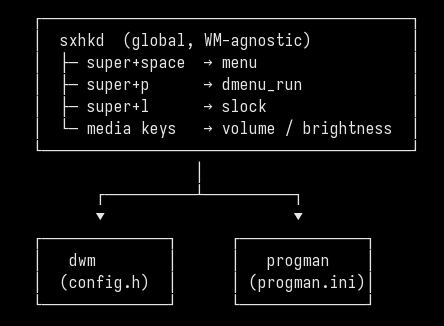
the secret:
sxhkd handles the keys.
the WM handles the windows.
dmenu handles the launching.
swap any one. the others don't notice.
┌─────────────────────────────────────────┐
│ sxhkd (global, WM-agnostic) │
│ ├─ super+space → menu │
│ ├─ super+p → dmenu_run │
│ ├─ super+l → slock │
│ └─ media keys → volume / brightness │
└─────────────────────────────────────────┘
│
┌──────────┴──────────┐
▼ ▼
┌──────────────┐ ┌──────────────┐
│ dwm │ │ progman │
│ (config.h) │ │ (progman.ini)│
└──────────────┘ └──────────────┘
#suckless #unix #dwm #slackware
sxhkd handles the keys.
the WM handles the windows.
dmenu handles the launching.
swap any one. the others don't notice.
┌─────────────────────────────────────────┐
│ sxhkd (global, WM-agnostic) │
│ ├─ super+space → menu │
│ ├─ super+p → dmenu_run │
│ ├─ super+l → slock │
│ └─ media keys → volume / brightness │
└─────────────────────────────────────────┘
│
┌──────────┴──────────┐
▼ ▼
┌──────────────┐ ┌──────────────┐
│ dwm │ │ progman │
│ (config.h) │ │ (progman.ini)│
└──────────────┘ └──────────────┘
#suckless #unix #dwm #slackware
Spent the day exploring heirloom-ex-vi (n-t-roff). It's
essentially the cleaned-up 1985 ex/vi 3.7 code, brought
forward by Gunnar Ritter and Carsten Kunze: small, simple,
and very readable — about 25k LOC for the editor itself,
versus 38k for nvi. The memory footprint is lower too,
around 3MB RSS against nvi's 6MB in typical use, and it
feels snappy in daily use.
The limits are by design rather than oversight. Fixed
temp-file blocks and a line-pointer table capped at
LBLKS=900 in the default build give you about 230k lines,
or roughly 30MB of text. Beyond that, you get the classic
"Tmp file too large" — and that's fine, because a screen
editor isn't the right tool for huge files anyway.
Trade-offs worth knowing: no
undo, and a hard ceiling on file size. nvi is more
practical for daily work, especially if you live in YAML
where column awareness matters. But heirloom is closer to
the original, and the codebase is genuinely beautiful.
Worth a look.
For anyone curious about the details, I keep a longer note
on heirloom-ex-vi here:
https://repo.or.cz/code-notes.git/blob_plain/HEAD:/notes/Exploring_Heirloom_ex_vi.txt.
Updated today with the LARGEF rebuild instructions for
files beyond the default ceiling.
#vi #unix #suckless #nvi
essentially the cleaned-up 1985 ex/vi 3.7 code, brought
forward by Gunnar Ritter and Carsten Kunze: small, simple,
and very readable — about 25k LOC for the editor itself,
versus 38k for nvi. The memory footprint is lower too,
around 3MB RSS against nvi's 6MB in typical use, and it
feels snappy in daily use.
The limits are by design rather than oversight. Fixed
temp-file blocks and a line-pointer table capped at
LBLKS=900 in the default build give you about 230k lines,
or roughly 30MB of text. Beyond that, you get the classic
"Tmp file too large" — and that's fine, because a screen
editor isn't the right tool for huge files anyway.
Trade-offs worth knowing: no
set ruler, single-levelundo, and a hard ceiling on file size. nvi is more
practical for daily work, especially if you live in YAML
where column awareness matters. But heirloom is closer to
the original, and the codebase is genuinely beautiful.
Worth a look.
For anyone curious about the details, I keep a longer note
on heirloom-ex-vi here:
https://repo.or.cz/code-notes.git/blob_plain/HEAD:/notes/Exploring_Heirloom_ex_vi.txt.
Updated today with the LARGEF rebuild instructions for
files beyond the default ceiling.
#vi #unix #suckless #nvi
Edited 165d ago
dwm 6.8 dropped on Jan 30 and this one deserves attention.
Less than a month after 6.7, suckless pushed a security fix and bumped
the version. That's pretty rare for dwm.
If you noticed Telegram's image previews shaking in 6.7, that's why
a wrong return value check broke atom property reading entirely.
Patch: https://git.suckless.org/dwm/commit/a9aa0d8ffbb548b0b1f9f755557aef2482c0f820.html
Six lines changed.
Update your build.
#dwm #suckless #security #linux
Less than a month after 6.7, suckless pushed a security fix and bumped
the version. That's pretty rare for dwm.
If you noticed Telegram's image previews shaking in 6.7, that's why
a wrong return value check broke atom property reading entirely.
Patch: https://git.suckless.org/dwm/commit/a9aa0d8ffbb548b0b1f9f755557aef2482c0f820.html
Six lines changed.
Update your build.
#dwm #suckless #security #linux
Edited 251d ago
I use dmenu as my main UI, not just dmenu_run.
Super+Space opens a small menu script that launches apps and system actions (WiFi, reboot, shutdown),
all keyboard-driven via sxhkd.
No panel, no mouse menus, WM-agnostic.
#dwm #dmenu #sxhkd #x11 #linux #suckless
Super+Space opens a small menu script that launches apps and system actions (WiFi, reboot, shutdown),
all keyboard-driven via sxhkd.
No panel, no mouse menus, WM-agnostic.
#!/bin/shCurious how many dwm users do something similar vs bars / mouse menus.
ROOT=doas
# Open a terminal (st) with the given title and command
# example: st -t terminal_title -e command
term() {
st -t "$1" -e "${@:2}"
}
choice=$(printf "%s\n" \
"Browser" \
"Terminal" \
"IRC" \
"Mail" \
"PDF" \
"Editor" \
"Files" \
"Mixer" \
"WiFi" \
"Bluetooth" \
"Reboot" \
"Shutdown" |
dmenu -i -l 12 -p "Menu" \
-fn "Iosevka Term-11" \
-nb '#000000' -nf '#ffffff' \
-sb '#005f87' -sf '#ffffff')
case "$choice" in
Browser) firefox ;;
Terminal) term st tmux ;;
IRC) term senpai senpai ;;
Mail) term mutt mutt ;;
PDF) pdf-open.sh ;;
Editor) geany ;;
Files) term fff fff ;;
Mixer) term alsamixer alsamixer ;;
WiFi) term wifitui "$ROOT" wifitui ;;
Bluetooth) blueman-manager ;;
Reboot) "$ROOT" /sbin/reboot ;;
Shutdown) "$ROOT" /sbin/poweroff ;;
esac
#dwm #dmenu #sxhkd #x11 #linux #suckless
Edited 262d ago