
I don't know how recent this change is but I noticed #Firefox removed https:// from the address bar so now every link and every website I visit looks insecure. I know there is a padlock icon next to the address bar but it doesn't seem quite as easily scannable to me.
firefox


 Estou testando as abas à esquerda no #Firefox / #Librewolf, que fazem muito mais sentido na tela larga, embora, após tantos anos usando-as no topo, provavelmente precisarei de algum tempo até me acostumar à mudança.
Edited 1y ago

Browsers are still on the news and this time they're caught in the AI wars: https://world.hey.com/ricardo.tavares/ai-browsers-less-local-more-clouds-e19c5386 How does that help or threaten the web?

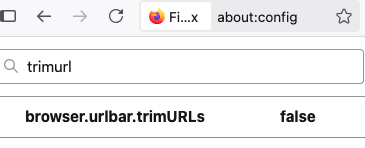
#firefox decided showing https in the address bar is too cluttery, this is how to switch it back

#uBlockOrigin has saved me from downloading #ReVanced YouTube + ReVanced YouTube Music + #microG lol


Are there any other great #extensions on #FireFox btw? I'm just using uBlock and YT Background Play, so someone help pls 
Dear @timbl,
I kindly ask you to consider talking to the people at #Mozilla to keep #xml documents with human-friendly rendering via #xslt visible in #Firefox.
Not only needs the web decentralisation, but also raw, machine-readable data in human-friendly appearance. #Feeds, #RDF, etc. Dropping #w3c standards and backwards-compatibiity in this regard makes the web an unreliable medium for long-term publishing and archiving of such documents, even more so for small entities with limited resources. Big players have no problem continuously overhauling their archives to meet the viewers' habits du-jour and adapt to fast-moving, volatile practices.
Please say no to this #enshittification.
Yours,
@mro
P.S.: I pledge a monthly Euro to such a browser.
Edited 141d ago

Y'know what? I don't think I ever swapped the hard drive on this #FreeBSD #laptop for an #ssd. I think it's still the 13 year old 5,400 RPM drive. Whoops.
Pretty sure that explains why it feels slower than molasses dripping down a freezer wall.
I mean, 16GB of RAM and a quad core i7 is still pretty good for a laptop running nothing but #openbox and #Firefox - though that has become quite the resource hog. 🤔

[$] A truce in the Manjaro governance struggle
Members of the Manjaro Linux distribution's community have published a "Manjaro 2.0 Manifesto" that contains a list of complaints and a demand to restructure the project to provide [...]
https://lwn.net/Articles/1063717/ #LWN #Linux #ArchLinux #Git #Firefox #systemd

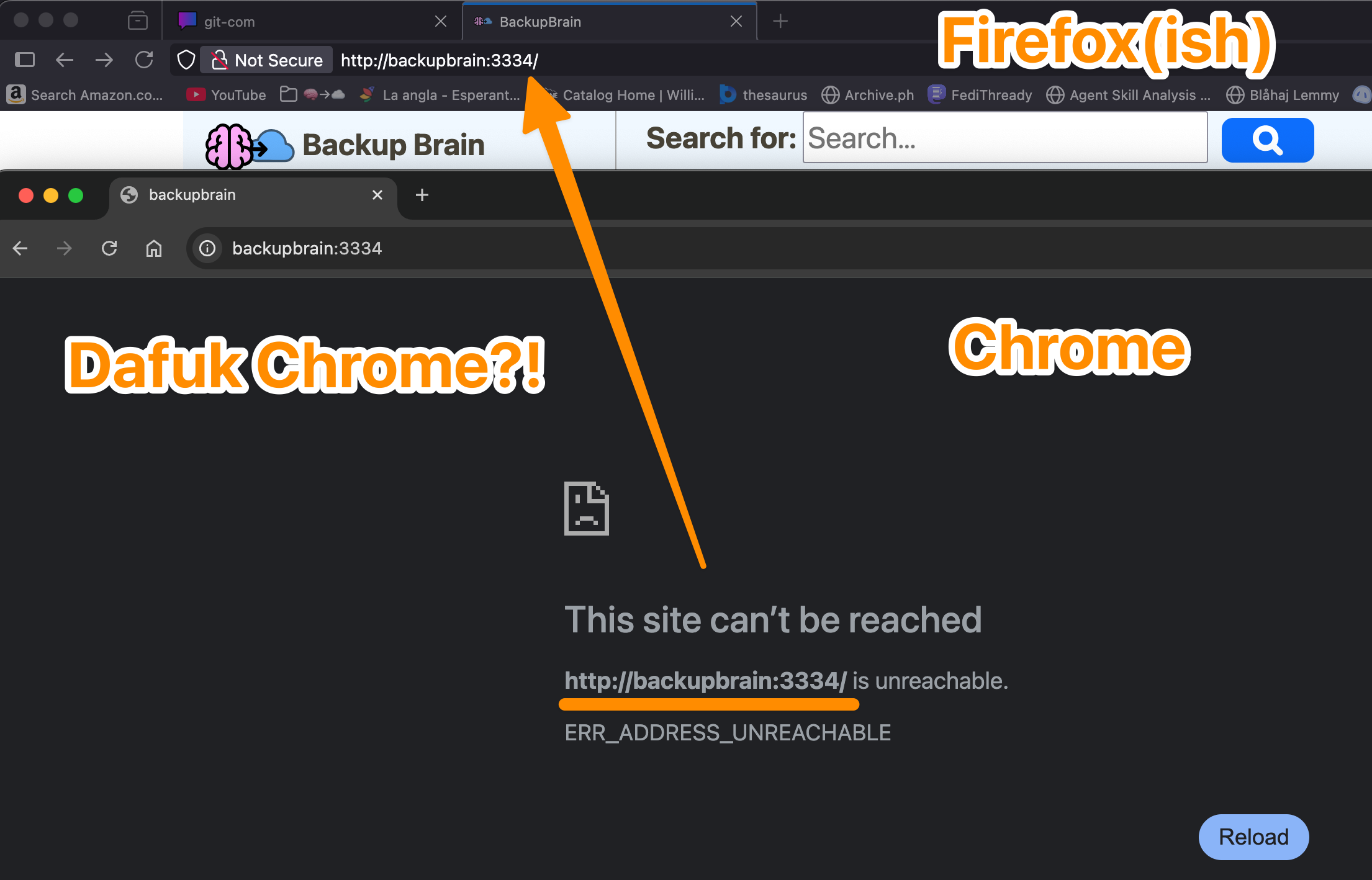
Any Chrome geeks know how to make chrome stop being stupid and let me access my damn site?
BackupBrain is running without SSL on another computer on my network. I didn't want to keep remembering the IP so I added this to my /etc/hosts
<its ip> backupbrain
It's there. It's worked in FF for years. What do I need to do to convince chrome to stop lying and let me access it?

NEW MASTODON BROWSER PLUGIN
FF: https://addons.mozilla.org/en-US/firefox/addon/mastodon-hashtag-helper/
Chrome: https://chromewebstore.google.com/detail/mastodon-hashtag-helper/cajmebgmalmdnhiemmedmnkfkahgecnp
Tried of trying to type hashtags correctly with proper capitalization? NO MORE. This plugin will track your 25 most used hashtags and add them to the post composer with 1 click. Also with edit more for easy delete from list.


After some reflection... I've decided to stick with #ubuntu for another two years and have upgraded all my machines (3 desktops, 4 servers) to 26.04 by doing:
$ sudo do-release-upgrade -d
On the desktop side, things went pretty smoothly and I only had to do the following after the update completed:
1. Resolve some configuration file conflicts, notably rsnapshot, nginx, and grub. For these, mostly used vimdiff afterwards to merge the maintainer's version into the local file.
2. Update apt sources in /etc/apt/sources.list.d. During upgraded, all third party repos are disabled and so afterwards, I had to go and re-enable or update them. Fortunately, I only had a few: google (chrome), steam, and weechat.
3. After updating, Ubuntu pro was not enabled for some reason (though I was enrolled and registered). To fix this, I did: "sudo pro enable livepatch" which also enabled the ESM repos.
That said, not everything was perfect:
1. On my laptop with a 1080p LCD, the default scaling was set to 125% instead of 100% due to it being a smaller screen (14in physically). I did not appreciate this... but I think once you set it to 100% it will be remembered.
2. The OSD for switching inputs is too small and so the text is truncated as shown in the video
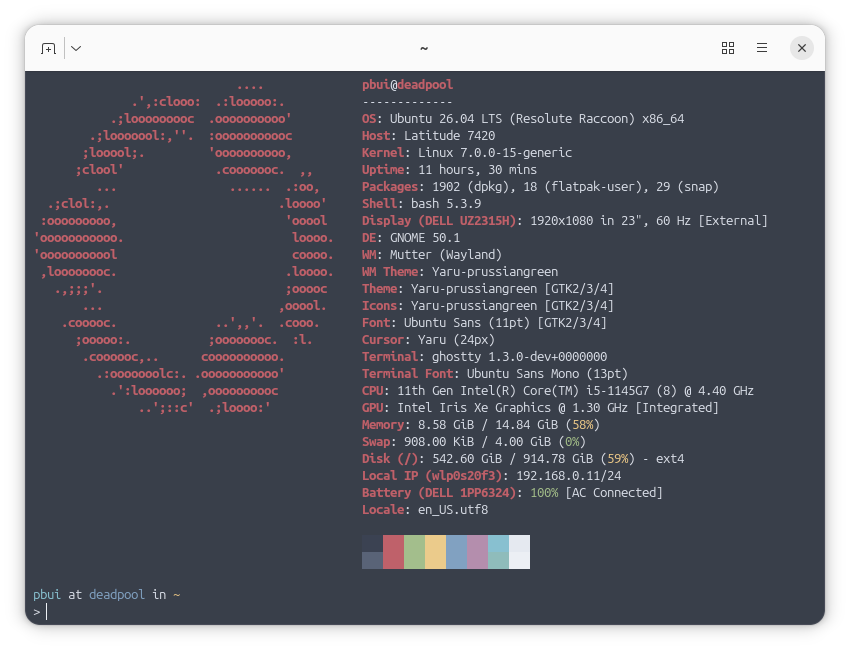
3. Epiphany (aka #gnome web) was only version 49 and the font rendering was... blurry. Because of this, I switched back to #firefox (crazy I know) both on the desktop and mobile.
4. I am not a fan of the new default terminal ptyxis, so I installed #ghostty and am using that instead. My issues with ptyxis is that the window decoration does not follow the default color scheme and that it tries to do a bit too much. I did make a custom palette for ptyxis but it still did not behave right (ie. dimming), so I'm just using #ghostty (despite it having a bug with opening off centered with custom window width/height).
On the server side, the upgrades appeared to be fine... until I realized things were not working. In particular a few services stopped working due to #apparmor
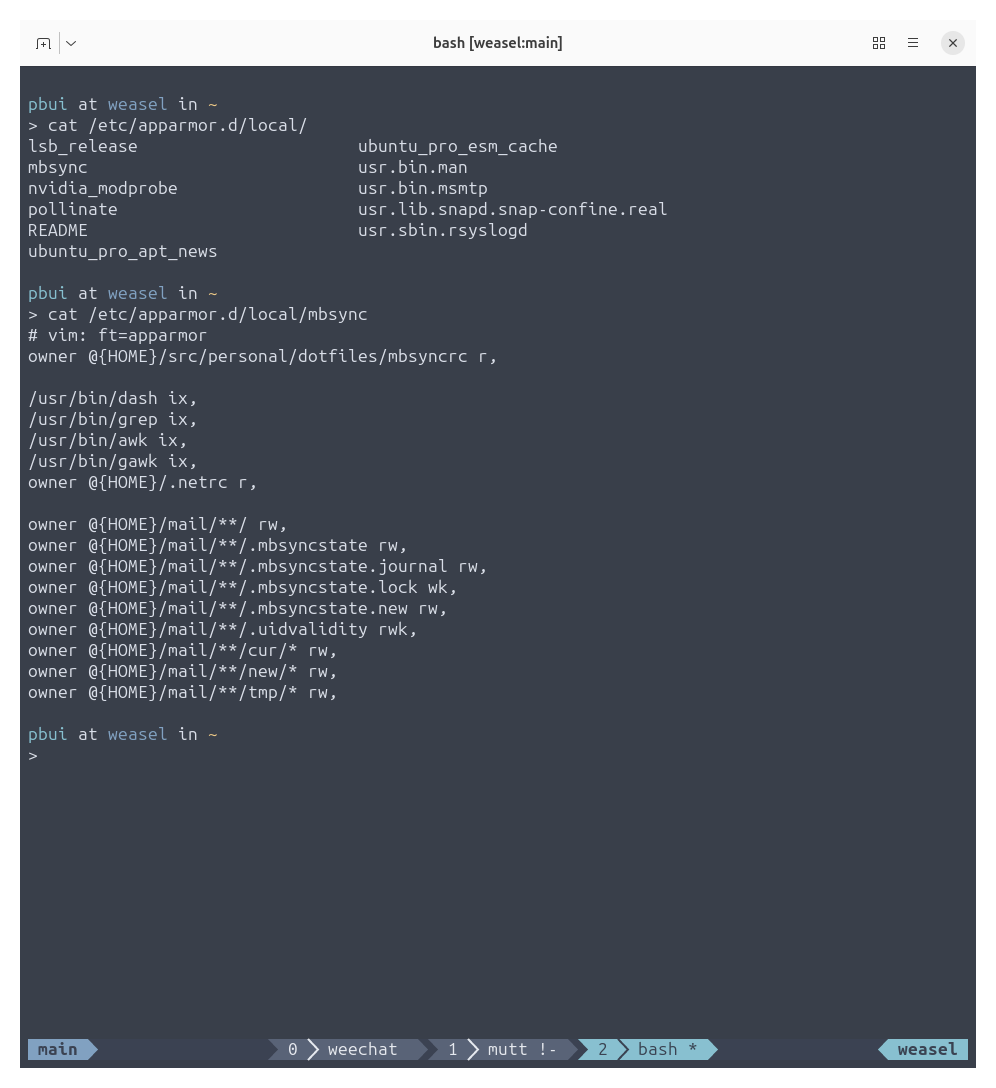
1. I had to write a custom apparmor profile for mbsync as shown below.
2. For wireguard and znc, I could not figure out how to write an appropriate apparmor profile, so I installed apparmor-utils and then did "sudo aa-complain" on the corresponding apparmor profiles to put them in complain mode (ie. audit but don't enforce)
I think this last part (the stricter apparmor profiles) will probably bite a lot of people... particularly if you tend to use custom file locations for data and configs, so be warned!
Despite these hiccups, things appear to be running smoothly for now... :}

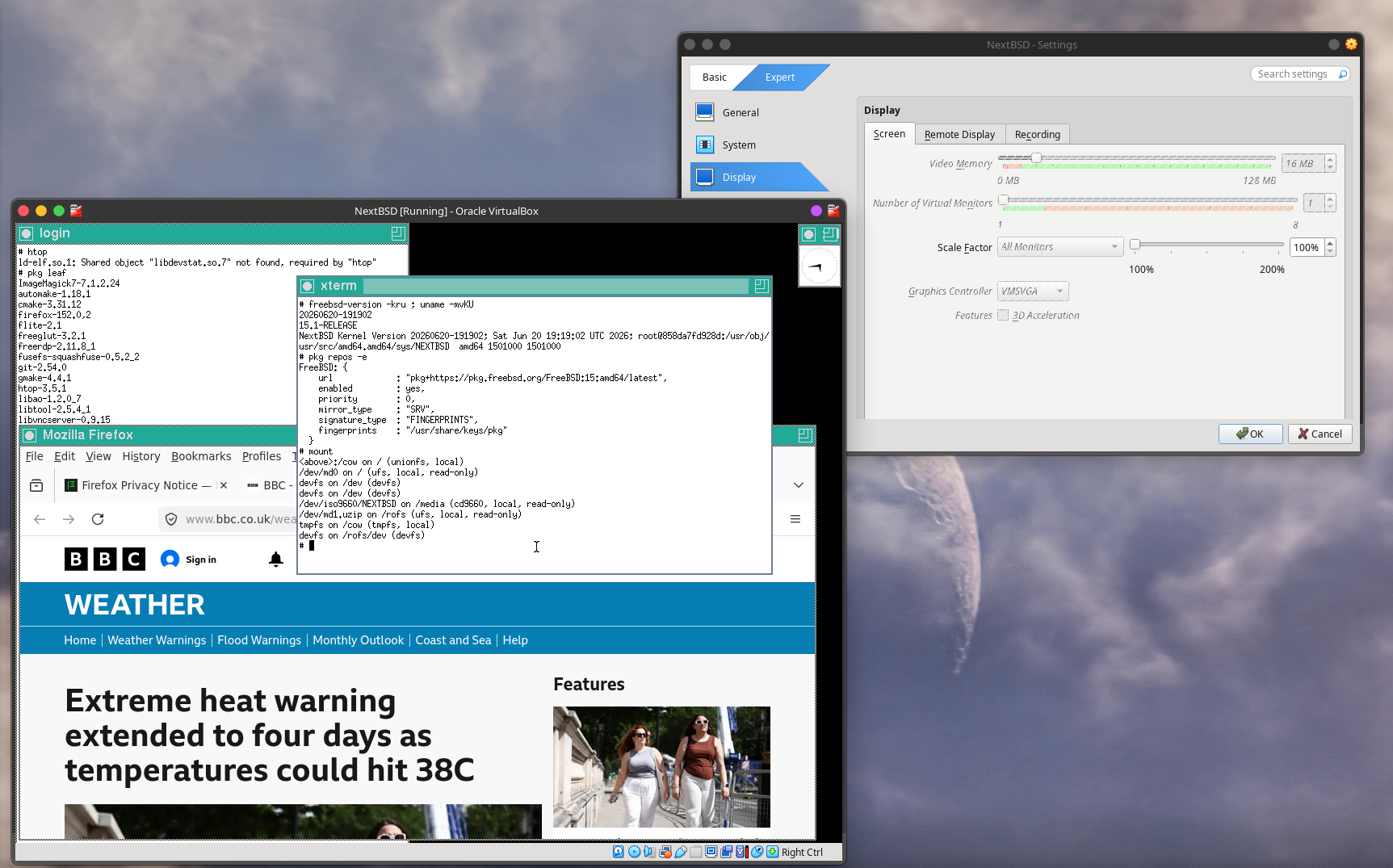
NextBSD in Oracle VirtualBox on Kubuntu 26.04.
1501000 kernel.
1501000 userland, 15.1-RELEASE.
NextBSD-amd64-20260621-043806.iso
― booted from the ISO, without installing to a virtual disk.
Firefox 150.0,2 and TWM installed from FreeBSD's latest repo for 15 on AMD64.
Trying FreeBSD as a Linux user – Kenvexity – YouTube
https://www.youtube.com/watch?v=bdUwCQttWKM&t=25s
I enjoyed this video. Very down-to-earth.
Some key points at <https://www.reddit.com/r/freebsd/comments/1ubn8mp/trying_freebsd_as_a_linux_user_kenvexity/>.
#FreeBSD #KDE #Plasma #Xorg #TWM #graphics #hardware #Firefox #Linuxulator #Steam

Customizing the Font in Firefox Reader View
Gain the freedom to choose a custom font in Mozilla Firefox Reader View by following this step-by-step guide on a desktop operating system.
https://www.adamsdesk.com/posts/firefox-reader-view-custom-font/


RE: https://mastodon.social/@ppcland/116882926455601689
This is the kind of dumb assessment bred by the #BuyEuropean narrative:
The #DigitalMarketsAct led to the #Mozilla #Firefox browser to gain 6 million EU users and we whine about it not being "European."
And no need to reply how terrible Mozilla's decision often are, I'm aware. But they currently maintain the only reasonably successful alternative engine to #BigTech and it's #FOSS. Of course this should be celebrated.

RE: https://cosocial.ca/@mhoye/116975530665832960
Context: this is the (interim) VP of Firefox admitting that he doesn’t understand the purpose of the slack channel used to report and discuss negative online sentiment and PR about Mozilla.
Pangram AI Detection
https://addons.mozilla.org/addon/pangram-ai-detection/
"… Pangram Labs is the most accurate AI detector on the market, as verified by the University of Chicago and the University of Maryland. Check any text for AI on any page, in any document, without switching tabs. …"
Post-installation:
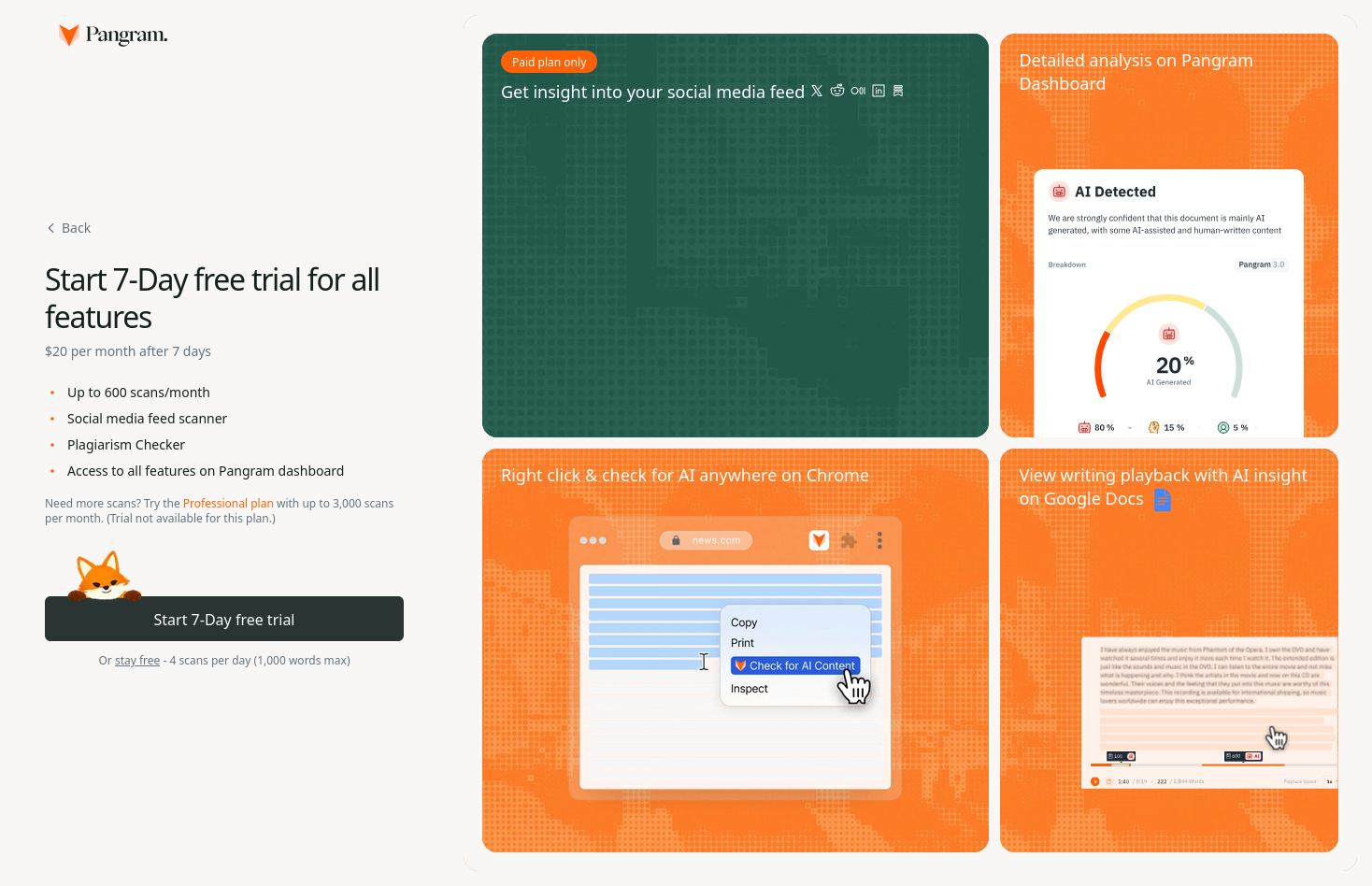
<https://www.pangram.com/chrome/onboarding?source=install> – account required. After a seven-day free trial:
― 4 scans per day (1,000 words max) free.
@pangramlabs (automated)
Has Firefox removed the Containers functionality? I have a FF v152 fresh installed I can't find them.
#firefox
#firefox



FINALLY! A NoAI DuckDuckGo extension for firefox-based browsers!
https://addons.mozilla.org/en-US/firefox/addon/duckduckgo-no-ai-search/

hello, do you have a preferred #firefox #browser #extension for monitoring page updates? i want to monitor some company websites for jobs postings.
please be normal. 

Firefox recently announced via Bluesky post: “Our support for uBlock Origin isn’t going anywhere.”
Every other major browser has ended support. Brave still has its own built-in adblocker, but has also dropped ManifestV2 support, affecting other addons as well

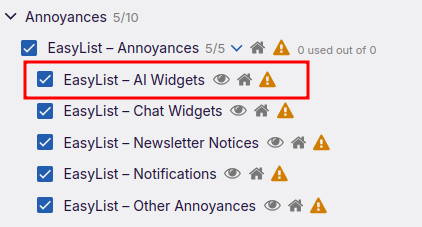
PSA: uBlock Origin's EasyList has an AI Widgets option that doesn't get turned on by default, including if you had other EasyList items selected already before it was added.
Enabling it removes a number of various AI buttons, nags, prompts, etc. across various sites.

A few days ago, I enabled tagged PDF generation in #Firefox Nightly! So, whenever you create a PDF from a web page using the Save to PDF option in the Firefox Print dialog, it will now be (mostly) accessible with assistive technology, assuming the original page was accessible of course. I say "mostly" accessible because this isn't perfect yet, but it's a massive step forward from producing completely inaccessible PDF documents. It also generates a document outline (table of contents) from the headings in the document.
This is very new code, so it's only enabled in Nightly for now and we'll probably let it bake in Nightly for a few weeks at least before we consider shipping it to release.
#accessibility
TIL – eight months after the feature was announced:
Copy Link to Highlight allows users to share arbitrary sections of a page with others by copying a link through the context menu with a given selection
<https://www.firefox.com/en-US/firefox/145.0/releasenotes/#note-791202> (November 2025)
Copy Link to Highlight in Nightly – These Weeks in Firefox: Issue 185 – Firefox Nightly News
<https://blog.nightly.mozilla.org/2025/07/28/copy-link-to-highlight-in-nightly-these-weeks-in-firefox-issue-185/> (July 2025) via <https://mastodon.social/@firefoxnightly/114805708639661562>
<https://connect.mozilla.org/t5/ideas/copy-link-to-highlight/idi-p/16058> (October 2022)